

Where this post comes from: This article is based on our own use of the NSE and BSE bhavcopy downloads, SEBI’s UDiFF guidance document, circulars from NSE, and the UDiFF pages of NSE Clearing and BSE. Screenshots are from nseindia.com and bseindia.com, taken on 24 September 2026.
Have you ever tried to compare the NSE bhavcopy (also spelled “bhav copy”) with the BSE bhavcopy?
If you have, you have probably faced this problem. The two files looked different. The columns had different names, in a different order. The same company had one code on NSE and another on BSE. Putting them side by side took more time than the analysis itself.
Here is the good news. Both exchanges now publish the UDiFF bhavcopy, one common format for both. And with the help of one number, the ISIN, you can match the same company across both files in seconds.
This article explains what the UDiFF bhavcopy is, what an ISIN is, and how to use the two together to analyse equities across NSE and BSE.
First, what is a bhavcopy?
A bhavcopy is the daily price file an exchange publishes after the market closes. “Bhav” means price. For every stock traded that day, it lists the opening price, high, low, closing price, the number of shares traded and the total value traded.
Investors, analysts and software tools use it to track prices, volumes and market activity over time. It is free to download from each exchange’s website.
What is the UDiFF bhavcopy format?
UDiFF stands for Unified Distilled File Formats. The UDiFF bhavcopy is the daily price file built on that format.
It came from a recommendation of SEBI’s Market Data Advisory Committee (MDAC). The idea was simple: every market institution in India, meaning the stock exchanges, commodity exchanges and clearing corporations, should publish their data files in one standard, matching format.
As NSE Clearing puts it, the formats of data files shared with market participants “shall be standardized and harmonized” so that it “will facilitate ease of doing business in the Indian securities market.” The new standard formats were named Unified Distilled File Formats.
UDiFF covers files for the equity cash market, futures and options, currency derivatives, commodity derivatives and electronic gold receipts.
Why was it needed?
SEBI’s own UDiFF guidance document gives a striking example. Take the trade file, which lists every executed trade and is one of the most downloaded files in the market. Before UDiFF, nine market institutions (exchanges and clearing corporations) across four segments had 28 different formats for this one type of file. Because trading members and clearing members often got different versions, the real number was close to 56.
Most of the fields in these files were the same. Only the layout was different. Every broker, data vendor and analyst had to write and maintain separate code for each version. The UDiFF bhavcopy replaces that with one consistent format, which cuts cost and effort for everyone.
When did the UDiFF bhavcopy switch happen?
NSE ran the old and new bhavcopy files side by side for a while. As per NSE’s circular dated 12 June 2024, the old bhavcopy files for all segments were discontinued from 8 July 2024. Since then, the UDiFF bhavcopy is the standard daily file.
Where to find the UDiFF bhavcopy
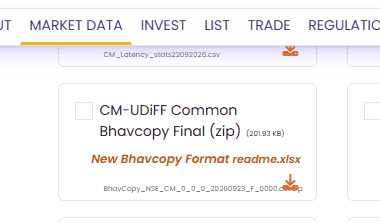
On NSE: Go to Market Data → All Reports (nseindia.com/all-reports). In the Equities section, look for “CM-UDiFF Common Bhavcopy Final (zip)”. NSE also links a readme file that explains every column.
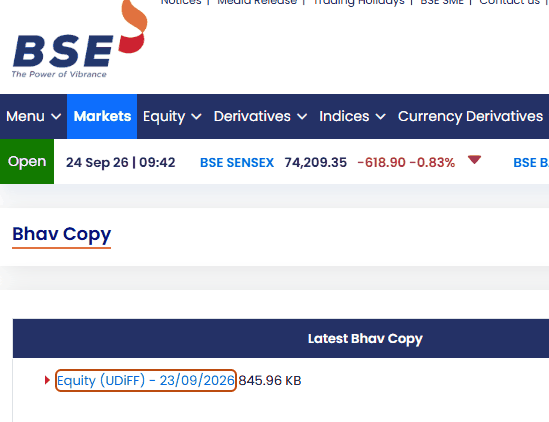
On BSE: Go to Markets → Bhav Copy (bseindia.com/markets/marketinfo/bhavcopy). Under “Latest Bhav Copy”, look for “Equity (UDiFF)” with the date.
Notice the file names too. NSE’s file for 23 September 2026 is named in the pattern BhavCopy_NSE_CM_0_0_0_20260923_F_0000. The name itself tells you the exchange (NSE), the segment (CM, the cash market), the date and that it is the final (F) file. This naming style is part of the UDiFF standard, so it is easy for a program to pick up the right file every day.
The key column: ISIN
Because both files follow the same standard, the column names are the same. A few of the most useful ones:
TradDt – the trading date
ISIN – the International Securities Identification Number
TckrSymb – the ticker symbol
FinInstrmId – the exchange’s own code for the security
FinInstrmNm – the name of the security
OpnPric, HghPric, LwPric, ClsPric – open, high, low and close prices
TtlTradgVol – total number of shares traded
TtlTrfVal – total traded value (turnover)
A common format alone does not solve the matching problem, though. NSE and BSE still use their own codes for the same company. For example, Reliance Industries trades as RELIANCE on NSE and has the scrip code 500325 on BSE. So how do you know which row in the BSE file matches which row in the NSE file?
That is where the ISIN comes in. Reliance’s ISIN is INE002A01018 in both files. Same company, same share, same ISIN, on both exchanges.
The ISIN is the anchor that ties the two files together. Without one shared identifier, one shared file format would not be enough.
What is an ISIN?
ISIN stands for International Securities Identification Number. It is a 12-character code that identifies one specific security, such as an equity share, a bond or a mutual fund unit. The format is defined by an international standard, ISO 6166. In India, ISINs are allotted by NSDL (National Securities Depository Limited) for all securities except government securities.
Your demat account also stores your shares by ISIN, not by the exchange ticker. That is why shares bought on BSE can be sold on NSE: the depository sees the same ISIN either way.
How to read an Indian ISIN
Let us take INE624M01014 as the example.
| Position | Characters | Meaning |
|---|---|---|
| 1–2 | IN | Country: India |
| 3 | E | Issuer type: E means a company. (F is used for mutual funds.) |
| 4–7 | 624M | Issuer code: identifies the company |
| 8–9 | 01 | Security type: 01 means an equity share |
| 10–11 | 01 | Serial number of this security |
| 12 | 4 | Check digit |
So any ISIN that starts with INE and has 01 in positions 8–9 is an equity share of an Indian company. Bonds, debentures or preference shares from the same company share the same issuer code but carry a different security type. This is a handy filter: if you only want equity shares, keep the rows where the ISIN starts with “INE” and positions 8–9 read “01”.
The last character, the check digit, is calculated from the other 11 characters using a formula. If someone types even one character wrong, the check fails, so a system can catch the error immediately.
A live example: the name changed, the ISIN did not
Here is a real case from this week.
Lykis Limited (BSE code 530689, ISIN INE624M01014) had its board approve a change of name to Krowniq Limited in June 2026, and shareholders approved it at the AGM on 15 July 2026. On 24 September 2026, we saw the company appear on BSE under its new name.
If you were tracking this company by name, your records would suddenly break. “Lykis” disappears and “Krowniq” appears, and a simple spreadsheet would treat them as two different companies.
But the ISIN stays INE624M01014. Same company, same shares, just a new name. If you track by ISIN, your price history carries on without a gap.
But ISINs can change too
The ISIN is stable, but it is not permanent in every case. Some corporate actions lead NSDL to issue a new ISIN. A common example is a stock split, where the face value of each share is reduced.
When BEML Limited split its shares from a face value of ₹10 to ₹5, its ISIN changed from INE258A01016 to INE258A01024. Look closely: the issuer code (258A) and the security type (01) stayed the same. Only the serial number moved from 01 to 02.
This gives you a simple rule:
Name or ticker changed, ISIN same → same security, just relabelled.
ISIN changed, but first 9 characters same and only the serial number moved → same company and same type of security, most likely after a corporate action such as a split. Check the company’s announcements before joining the old and new price series, because prices before and after a split are not directly comparable.
How to use the UDiFF bhavcopy and ISIN in your analysis
Here is a simple way to compare NSE and BSE for any day.
1. Download both files. Get the CM-UDiFF bhavcopy from NSE and the Equity (UDiFF) bhavcopy from BSE for the same date.
2. Keep only equity shares. Filter rows where the ISIN starts with “INE” and positions 8–9 are “01”. On NSE, you may also want to keep only the regular equity series (the SctySrs column value “EQ”).
3. Join the two files on ISIN. Because the column names are identical, you can put them side by side without renaming anything.
4. Compare. Now you can see, for each company:
Where most of the trading happens (compare TtlTradgVol and TtlTrfVal).
Whether the closing price differs between the two exchanges (ClsPric).
Which companies trade on only one exchange (they will have no match in the other file).
5. Track over time. Save each day’s joined file and keep ISIN as your key. Name changes will not break your history. Where an ISIN changes, use the first 9 characters to spot the link and check the corporate action.
Tip: you can do all of this in a spreadsheet
You do not need any special software. Excel or Google Sheets is enough.
1. Unzip the NSE file and open it. Open the BSE file in a second sheet of the same workbook. Name the sheets “NSE” and “BSE”.
2. In the NSE sheet, add a helper column called “Equity?” with this formula (assuming ISIN is in column G): =AND(LEFT(G2,3)="INE", MID(G2,8,2)="01"). Filter this column to TRUE to keep only equity shares.
3. Add another column called “BSE Close” and look up the same ISIN in the BSE sheet: =XLOOKUP(G2, BSE!G:G, BSE!R:R, "Not on BSE"), where column R holds ClsPric. (In older Excel, use VLOOKUP or INDEX-MATCH instead.) Do the same for BSE volume or turnover if you want.
4. Sort, filter and compare. Rows that say “Not on BSE” are stocks that trade only on NSE.
Because the column layout is the same every day, you can save this workbook as a template and simply paste in the new files each evening. Before you rely on the formulas, check the column letters in your own download, and spot-check a few rows against the exchange website.
The bottom line
The UDiFF bhavcopy gave NSE and BSE one common language for their daily files. ISIN gives every security one common name. Put the two together, and comparing the same stock across both exchanges becomes a simple join instead of a painful cleanup job.
This article is for information and education only. It is not investment advice, and it is not a recommendation to buy or sell any security. File formats, rules and company details can change, so please check the latest information on the exchange and depository websites. Any mistakes in summarising the sources are the author’s own.
Key takeaways
- What the UDiFF bhavcopy is: UDiFF stands for Unified Distilled File Formats, a common format for market data files that came from a recommendation of SEBI’s Market Data Advisory Committee. NSE and BSE now publish their daily bhavcopy in it, and NSE discontinued the old bhavcopy files from 8 July 2024.
- The matching key: NSE and BSE still use their own codes for the same company, so the ISIN, a 12-character code that is the same on both exchanges, ties the two files together. For example, Reliance Industries is RELIANCE on NSE and 500325 on BSE, with the same ISIN, INE002A01018, in both files.
- When things change: A change of name or ticker leaves the ISIN the same, but some corporate actions, such as a stock split, can lead to a new ISIN. Check the company’s announcements before joining old and new price series.
Frequently asked questions
A bhavcopy is the daily price file an exchange publishes after the market closes. For every stock traded that day, it lists the opening price, high, low, closing price, the number of shares traded and the total value traded. It is free to download from each exchange’s website.
UDiFF stands for Unified Distilled File Formats. It came from a recommendation of SEBI’s Market Data Advisory Committee that every market institution in India publish its data files in one standard format. Before it, nine market institutions across four segments had 28 different formats for the trade file alone, and close to 56 once the different versions for trading and clearing members are counted.
An ISIN is a 12-character code that identifies one specific security, defined by the ISO 6166 standard. In India, NSDL allots ISINs for all securities except government securities. In INE624M01014, IN is the country, E means a company, 624M is the issuer code, 01 in positions 8 and 9 means an equity share, the next 01 is a serial number, and the last character is a check digit.
Download the NSE CM-UDiFF bhavcopy and the BSE Equity (UDiFF) bhavcopy for the same date, keep only equity shares (ISINs that start with INE and have 01 in positions 8 and 9), and join the two files on ISIN. You can then compare volume, turnover and closing prices, and spot companies that trade on only one exchange. Excel or Google Sheets is enough.
If the name or ticker changes, the ISIN stays the same, as with Lykis Limited becoming Krowniq Limited (INE624M01014). A stock split can lead to a new ISIN: when BEML split its shares from a face value of ₹10 to ₹5, its ISIN changed from INE258A01016 to INE258A01024, with only the serial number moving. The article advises checking the company’s announcements before joining old and new price series.
Sources
Main sources
SEBI, “UDiFF Standards for Generation and Implementation” (guidance document, V2023.10) – nsearchives.nseindia.com
NSE Clearing, “Unified Distilled File Formats (UDiFF)”, updated 14 May 2026 – nseclearing.in/udiff
BSE, “Unified Distilled File Formats (UDiFF)” – bseindia.com
NSE circular 48/2024 dated 12 June 2024, on discontinuing old bhavcopy files from 8 July 2024 – NSE circular (copy)
Other sources
NSE All Reports page – nseindia.com/all-reports
BSE Bhav Copy page – bseindia.com
NSE circular 314/2024 dated 26 April 2024 – nsearchives.nseindia.com
ISIN structure and ISO 6166 – Wikipedia
Indian ISIN structure and security-type codes – india-isin-data (GitHub)
ISIN serial change after a split (BEML example) – TIGZIG blog
Lykis AGM approval of name change to Krowniq – ScanX
Lykis board approval (15 June 2026) – Kotak Neo
Disclaimer: I used Claude, an AI assistant, to turn my notes into a more reader-friendly article.